"Chattering" in the context of simulation is typically related to models that are generating lots of events during simulation. Without going into a lot of detail, high frequency events during simulation generally cause the simulation to slow down and in some cases become unstable.
State events are generally the most significant of the event types where we get a discrete change of value of a variable and the state variables get recomputed through iteration to find consistent conditions for the simulation to continue. So you can imagine that each time you get a discrete change in value of a variable and the state variables need to be recomputed the simulation effectively becomes discontinuous, almost like a stop-start behaviour. We can track the state events either within the dymosim.exe window during simulation by selecting the relevant "debug" options within the Simulation Setup dialog or enabling the diagnostics from within the dymosim.exe window itself during the simulation.
So when someone tells me their simulation runs slowly or the logs say that there is chattering, the state event frequency is what I analyse and what is generating those state events. We're not done yet though...
Time Events and where they mainly come from:
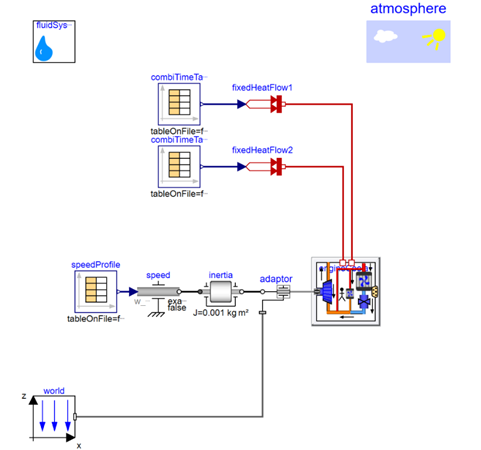
There is another situation where events can make models run slowly and these are where time events are being generated at high frequency. When can this happen? One typical example is when we are playing back measured data with high frequency sample rates using TimeTable or CombiTimeTable from Modelica Standard library (Figure 1). By default these tables will trigger/generate time events at each data point. This can be turned off within the CombiTimeTable within its parameter dialog window (Figure 2) but detail might be lost if the model is running in a near steady state condition and the data points are not all captured as time events. So you should always check the results before accepting new simulation settings or new model settings. In the example below the key variable results were unchanged, so the improved table settings were accepted (Figure 3).
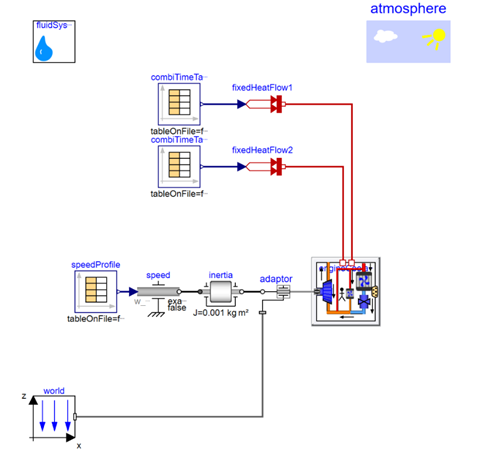
Figure 1. Diagram layer of a cooling system test bench with data played back from the experimental rig via the tables. 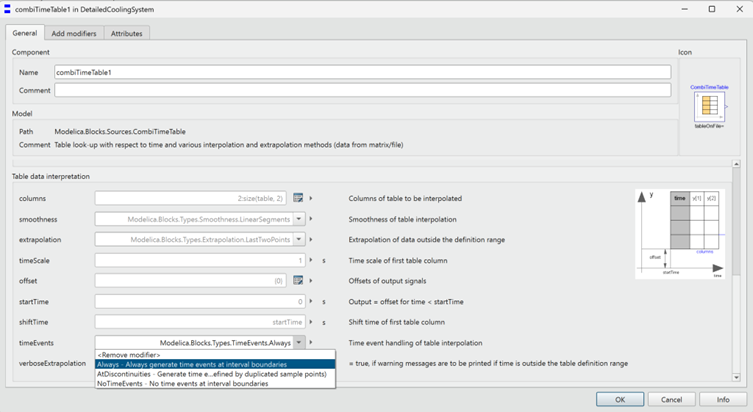
Figure 2. Snapshot of the diagram layer of one of the combiTimeTable instances showing the options we have for suppressing time events. 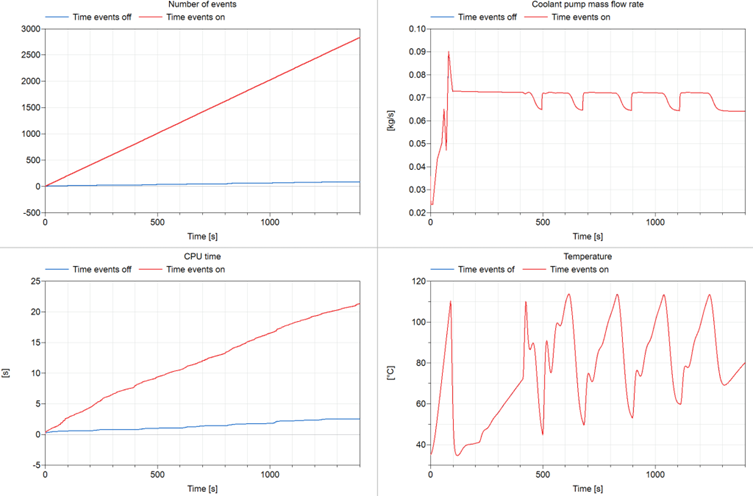
Figure 3. Snapshot of the events generated (all types) - top left, CPU time - bottom left, and two key variables - top and bottom right, from the experiment showing the simulation performance differences, in particularly when high sample rate data is being played back (>100Hz) with and without event suppression. 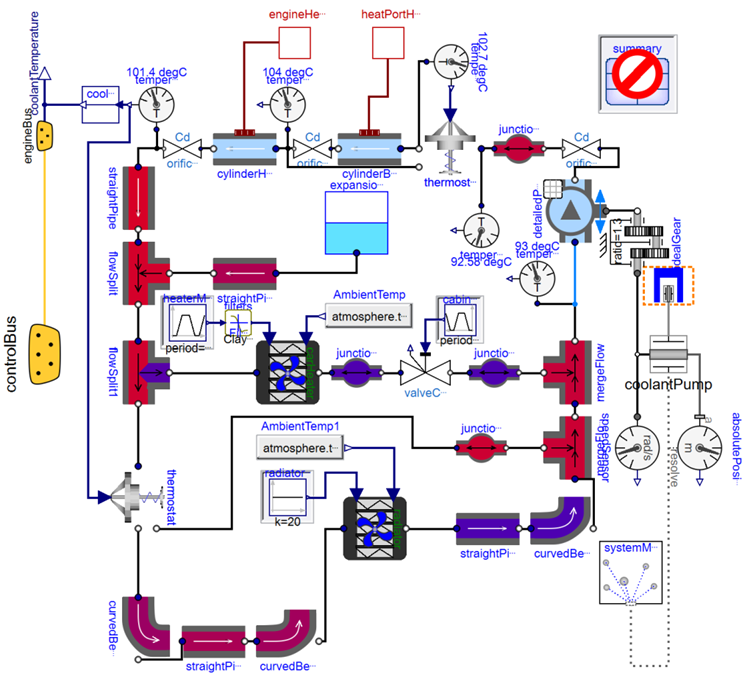
Figure 4. Dynamics diagram for the cooling circuit to improve debugging and system state verification.
The model in Figure 4 uses enhanced icons that can be linked to variables that are calculated within each component to display the state of each part of the system to form an intuitive and overall visual of state the system.
Why not reach out for a free health check of your models so we can propose a list of improvements and adjustments we can help make your models more robust and faster to simulate? We can also propose suitable training courses that will accelerate your modelling tasks.
Previous blog posts that go into more detail can be found here:
More information can be learned on this dedicated course: https://www.technia.com/en/training/model-debugging-and-performance-analysis/
Model performance blogs:
https://blog.technia.com/en/mbse/a-closer-look-at-dymola-events
https://blog.technia.com/en/mbse/investigating-events-in-your-dymola-model/
Model icon enhancement blog:
https://blog.technia.com/en/mbse/how-to-build-an-embedded-graphical-interface-in-dymola
 MBSE
MBSE