This is the eighth in the Dymola Basics Series, following on from a post about animation. This post explains the concept of inheritance and the effective use of it within Dymola.
Dymola models can be based on layers were models inherit properties from more basic models. Dymola uses the keyword extends to inherit properties of a base model. While this example shows the extending and replacing of a model type, the method can be used with other types within Dymola such as a function or type.
A base class, at the bottom level, should contain the universal properties that are shared by all the extended models reducing duplication of calculations and sub-components. To allow the base class to be more applicable to a wider range of uses it could include some connectional connectors that allow for multiple variations.
As the base model is not complete and would not be able to run, the model should be declared as partial, this declares that this base model does not have enough information to be simulated therefore it needs to be extended and completed by defining all the variables.
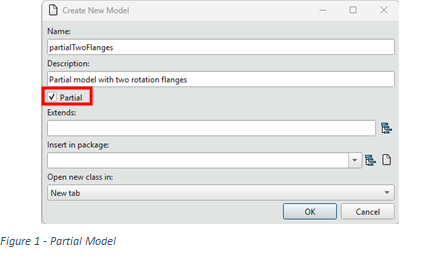
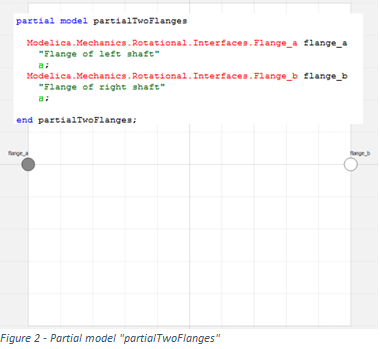
A new model can be declared as partial by creating clicking the partial declaration shown in Figure 1 or adding the definition “partial” to the model definition as shown in Figure 2.
The partial base class can have any type of connection, sub-component or declare any variable without the full definition as long as the final model has all connections and variables defined with variables declared (exist within the model at any level) but not constrained (not calculated) even if they are not used as an output. Examples of base classes can be found in the Modelica Standard Library such as the Modelica.Mechanics.Rotational.Interfaces.PartialTwoFlanges used within this article:
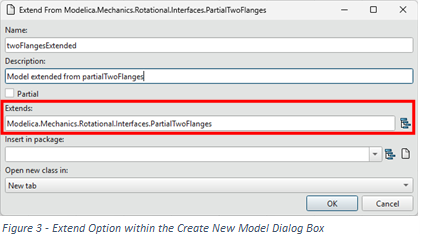
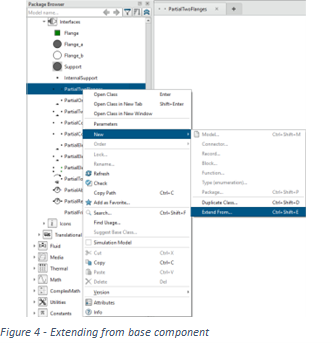
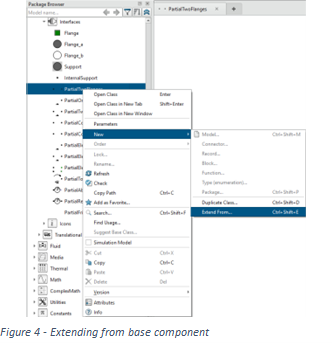
When creating a component that is to be extended from another component either path of the base class can be put into the Extends input box as shown in Figure 3 or a model can be extended directly from the base component by right clicking on the base model (in this case partialTwoFlanges) and then selecting New and Extend From... as shown in Figure 4. This then brings a Create New Model dialog box with the Extends input box already populated with the selected base component.
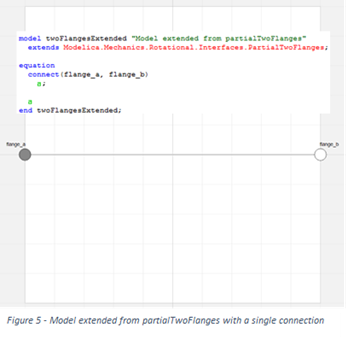
In this example this allows the model to inherit the two connectors shown in Figure 2 with only the extends declaration as shown in Figure 5. The model is not partial as it has the connect statement that simply connects the two flanges together without affect which means that all variables are constrained.
Dymola has the ability to replace components but it is recommended that the replacement at least has the same connectors which lends to using the extend functionality to define the interfaces at the base level. Any component extended from the same base model can then be linked by that base model and aid the control the available replaceable components.
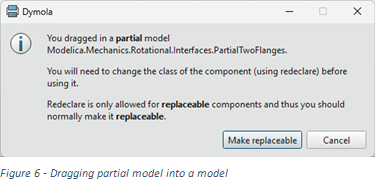
There are several methods of making a component replaceable; if using the method mentioned above the partial model shown in Figure 2 (partialTwoFlanges) can be dragged from the Package Browser by left clicking dragging it onto the diagram layer of the model that will use the replaceable; the dialog box shown in Figure 6 is shown which then ensures that the partial model is replaceable.
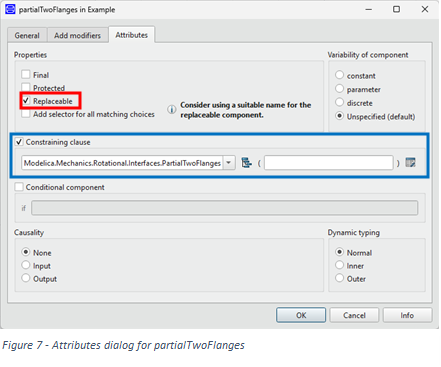
A component that is already within a model can be declared as replaceable by going to the Attributes tab in the parameter Dialog box in Dymola 2017, or right clicking on a component and selecting Attributes from the drop down menu in older Dymola 2017. In both instances there is a window similar to Figure 7 where there is the option to make the component replaceable as highlighted in red.
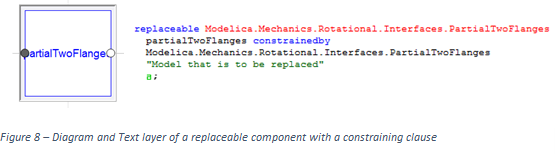
The replaceable declaration can be used in conjunction with a constraint clause that allows the component to be replaced with a component that has been extended from the model declared within the clause. Figure 7 highlights the option for the Constraining Clause of the constraining model and any modifications to the clause in the blue box. Figure 8 shows the section of the text layer that declares the replaceable component modified above in Figure 7.
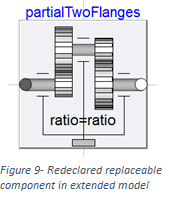
Making a component replaceable also changes to how the component is displayed in the diagram layer with a grey box around the component. An indented box with the dark edges at the top left means that the component has not redeclared from the base level, when the bottom right edges of the component are darkened then the component has been redeclared.
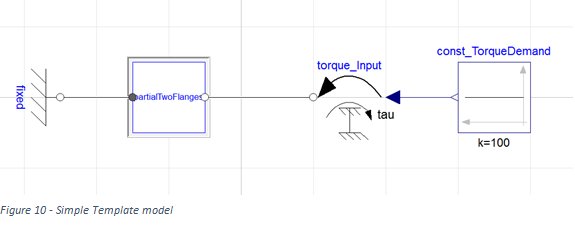
This replaceable constraining can allow for a different type of partial base class called a template, which is a collection of replaceable components within a fully laid out structure, meaning that while the connections are made the components are not selected and the partial models can be used as placeholders. The model shown by Figure 10 is a very simple template using the models made above with the replaceable model being the partialTwoFlanges made above. While the example uses a component that is both constrained by and declared as a partial model to make it a template both the declaration and constraint can also be a normal component (not partial).
While any component within a model can be partial, a model with partial components cannot be simulated.
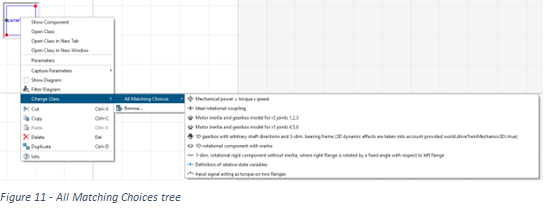
To replace a component right-click on a replaceable component and select Change Class and the option to change class to any model within the Package Browser using Browse. There is also the dropdown menu All Matching Choices that access a selection of the all the components extended from the same model as the component selected.
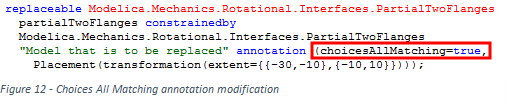
The option to view the replaceable model parameters are now also added to the parameter dialog box. But to allow the replaceable model to be replaced from the level above but there is an ability to improve usability and add a drop down menu that displays the same list as All Matching Choices shown above. The way this functionality is available within all versions of Dymola but to apply it in Dymola 2017 and on the attributes tab in the parameter Dialog Box as shown in Figure 7 includes a check box to Add Selector for All Matching Choices above the constraining clause. In all versions of Dymola there is the option to add the definition to the annotation by adding choicesAllMatching=true to the annotation for the replaceable component as shown in Figure 12: