
 Engineering

 PLM
PLM

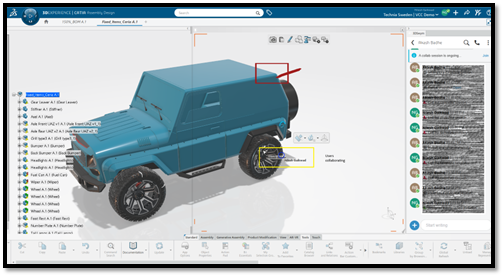
The 3DEXPERIENCE platform on cloud gives you the flexibility to work from anywhere in the world. Working from a single source of truth ensures there is always only one version of your CAD data. Unlike traditional legacy software, where CAD files were stored locally or scattered across different PDM systems, 3DEXPERIENCE keeps all data centralized and consistent. When multiple people collaborate on the same assembly or product, there’s a risk of overwriting each other’s progress.
3DEXPERIENCE CATIA addresses this by allowing users to work independently without interfering with data modified by others. There are several ways to achieve this within the system.
Concurrent engineering on the 3DEXPERIENCE platform
Users can perform concurrent engineering with the help of the 'lock' and 'unlock' commands.
The option for 'lock' and 'unlock' is accessed through the ‘Collaborative lifecycle’ option available in both web and native apps.

Security rules may block a user from saving changes to an object that is currently locked by another user. To manage this, use the 'lock' and 'unlock' commands found in the collaboration section of the action bar. Select the desired objects in the specification tree, then click 'lock', or 'unlock'. The corresponding dialog box will open.
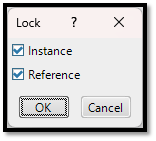
If all selected objects are reference objects, the 'lock' or 'unlock' dialog box will not appear; the reference objects will be locked or unlocked immediately. Depending on the object selected, you can apply a lock to the 'instance', the 'reference', or both.
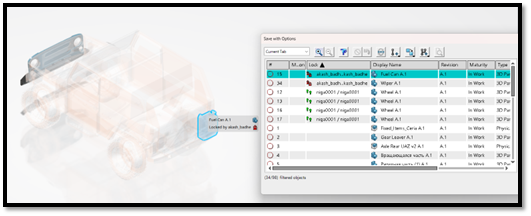
When an object is opened, each item in the tree displays a symbol that indicates the lock status of its reference and instance, or remains blank if no lock is applied. When applicable, the 'lock' column in the save dialog box shows the name of the user who locked the reference and/or instance, along with the corresponding lock symbol.
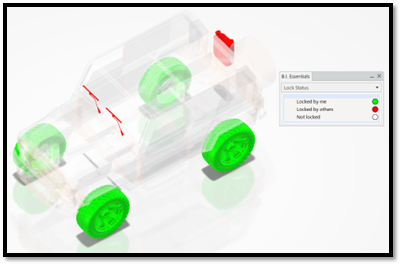
In the following example, the wheels are locked by the user who opened the data, which is why the 'wheel' object appears in green. The parts marked in red are locked by another user.
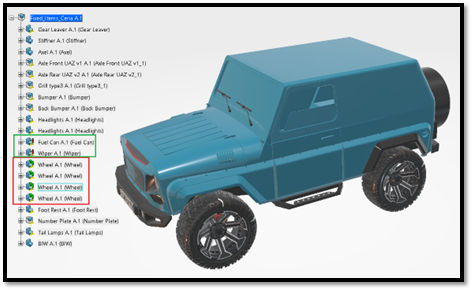
When saving an object, users can see which parts are locked, who locked them, and whether another user is currently working on the same object. The 'lock' column displays the user information for the current owner of each object. This provides controlled concurrent access and prevents data from being accidentally overwritten by others.
Icons and definitions
 |
Instance and reference are locked by you. |
 |
Instance and reference are locked by someone else. |
 |
Instance is locked by you, and reference is locked by someone. |
 |
Instance is locked by someone, and reference is locked by you. |
Monitoring products and projects with BI Essentials
BI Essentials is a business intelligence and analytics tool within the 3DEXPERIENCE platform that analyzes PLM (product lifecycle management) objects and their attributes to reveal useful information about their state. It enables users to analyze and visualize system data through reports and dashboards.
With BI Essentials, users can monitor project and product information, track performance, and gain insights into trends and key indicators. This supports informed, data-driven decisions by providing real-time visibility into platform data in a clear and organized way.
In this example, BI Essentials is used to identify locked objects within the structure. It shows which objects are locked by you and which are locked by other users, using color codes for easy identification.
Co-reviewing assemblies with 3DSWYM
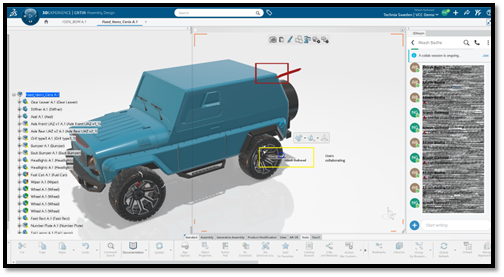
3DEXPERIENCE is a collaborative platform that enables users to work together efficiently. With the 3DSWYM app, users can co-review objects directly on the platform. This feature allows multiple users to work on the same assembly simultaneously for review purposes. They can highlight objects, provide design feedback, and capture screenshots; all within the same environment.
This collaborative approach enhances understanding of the design and speeds up the overall design process. In the image below, two users’ cursors are visible, along with a rectangle drawn to highlight an object:
.png?width=500&name=Blog-CAD%20Essentials-Smarter%20Tools%20for%20Faster,%20More%20Reliable%20CATIA%20Workflows%20(1).png)

 Advanced Simulation