 Advanced Simulation

.gif?width=720&name=Adobe%20Express%20-%20Modeling%20Interference%20Fits%20Using%20Abaqus%20Explicit%20main%20image%20(big).gif)
Interference fits: definition and simulation
An interference fit, sometimes referred to as a press fit or shrink fit, is a type of mechanical joint where one component is inserted into another with slightly mismatched dimensions, resulting in a tight connection. This dimensional overlap creates compressive stress and friction that hold the components together. Common examples include inserting a pin into a smaller hole, fitting a heated bearing onto a shaft, or compressing a rubber seal into a groove to form a high-pressure seal.
Simulating interference fits accurately is crucial for predicting how assemblies will perform under loads, including stress distribution, material deformation, and long-term durability. Inadequate simulation methods can lead to incorrect fits, excessive stress, or even failure of the assembly.
To analyze such complex assemblies, Abaqus provides two powerful solvers for finite element simulations: Implicit (Abaqus/Standard) and Explicit (Abaqus/Explicit). Each solver employs a different algorithm to manage nonlinearities, contact interactions, and large deformation key considerations when modeling flexible materials like rubber.
When simulating real-world assembly processes as interference fit problems in Abaqus, it's best practice to separate the steps: first, resolve the initial interference without friction, then introduce friction in a subsequent step. Abaqus addresses the initial interference using a shrink fit approach, where the interference distance is gradually in the first step to generate the correct stresses and strains. Crucially, In Abaqus/Explicit, resolving this interference too quickly can cause high velocities and large kinetic energy, compromising accuracy. To maintain stability, ensure the kinetic energy remains minimal by applying the fit slowly using a sufficiently large number of increments and avoiding the application of additional loads during this initial interference resolution step
Handling interference fits in Abaqus/Explicit simulations
When a simulation involves multiple steps, starting with an interference fit to resolve initial overclosures, followed by high-speed dynamic loading, the Explicit solver becomes particularly suitable. Unlike previous versions, Abaqus/Explicit gained the ability to handle interference fits properly in version 2019 FD01 (FP.1906). Before this, it could only handle initial overlaps through strain-free adjustments or by storing contact offsets, which didn’t capture true interference behavior. It has to be noted that this option is only available with General contact algorithm.
With the release of Abaqus 2020, the CAE interface introduced a more user-friendly way to apply interference fits in Explicit simulations. Through the Edit Contact Initialization dialog, users can now easily define contact initialization and choose to interpret initial overclosures as interference fits—making the setup process more intuitive and efficient.
Clicking the icon highlighted in Figure 1allows you to generate a contact initialization.
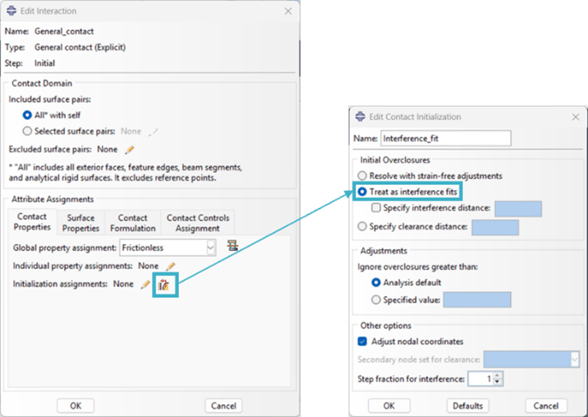
Figure 1. Creation of contact initialization in Abaqus/Explicit
The following parameters can be specified when setting up contact initialization as an interference fit:
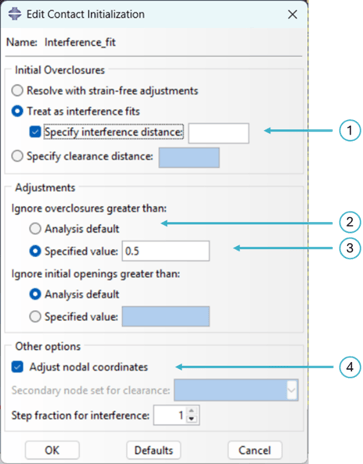
Figure 2. Interference Fit Parameters
1. Specify interference distance: this option is used to manually define the initial overclosure (interference) between contacting surfaces.
- Default behavior: Abaqus determines the interference based on the existing geometric overlap in the mesh.
- When specified: If you enable “Specify interference distance” and enter a value, Abaqus:
- Performs a strain-free nodal adjustment so that the overclosure matches the specified value.
- Gradually resolves the interference during the first step, generating stresses and strains that simulate the physical fitting process.

Figure 3. Defining a specified interference distance that differs from the mesh-based interference [2]
- Important considerations:
- The initial nodal adjustment is strain-free, but large specified interferences can distort the mesh and then negatively impact your analysis.
- The feature exists in both Abaqus/Standard and Abaqus/Explicit for general contact, although the specific implementation details (like the resolution over time) may vary slightly between the two solvers.
- In explicit analysis, it is recommended to resolve the interference fit gradually over a sufficiently large number of increments to maintain low kinetic energy and ensure stable results.
2. Adjustments: this parameter defines the contact initialization search criteria by specifying band above and below the surface. If you select ‘Analysis default’ the search zones exclude:
For solid surface:
An overclosure > Contact thickness + max (15% of Facet Dimension, Interference fit distance)
Where Contact thickness means the thickness Abaqus uses internally for contact calculations, Facet dimension means the element size attached to the penetrating (secondary) node and Interference Fit Distance: If you explicitly define an initial interference fit, that distance is used as part of the tolerance.
For shell surface:
An overclosure > Contact thickness
Where a shell contact thickness is typically defined at the mid-surface or based on surface layers.
So, if the initial overclosure is deeper than the default search band, it will be ignored which can lead to element distortion or non-physical results in an Explicit analysis.
3. You can override these default exclusions by explicitly defining Search Distances when assigning the contact initialization method:
- Search Distance Above: Setting a positive value here forces Abaqus to attempt to close initial gaps (clearances) up to this specified distance.
- Search Distance Below: Setting a positive value here forces Abaqus to attempt to resolve initial overclosures (penetrations) up to this specified distance. If you have an intentionally large interference fit, you must set the Search Distance Below to a value greater than your maximum interference depth.
4. Adjust nodal coordinates: this option results in the solver automatically correcting initial small interferences or gaps by shifting the nodal coordinates of slave nodes to remove the initial overclosure, facilitating a stable start to the contact simulation in Abaqus/Explicit. This adjustment is performed in the initial configuration and is strain-free.
The contact initialization can then be assigned as illustrated in Figure 3.
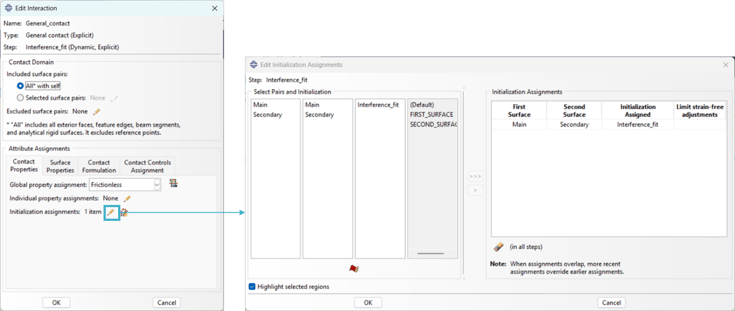
Figure 4. Contact Initialization Assignment
Case study example: axisymmetric O-ring seal simulation
This blog post addresses a key question: Is Abaqus/Explicit suitable for interference fit simulations in the same way as Abaqus/Standard, and under what conditions? We’ll compare the advantages and limitations of both methods through an axisymmetric O-ring seal example, considering factors like accuracy, convergence behavior, and computational efficiency.
An O-ring is a toroidal elastomeric gasket designed to fit into a machined groove, providing a seal between contacting components. In this study, the model includes three axisymmetric components: the piston, the cylinder, and the O-ring, which is placed in a gland within the piston. The sealing system poses a challenging simulation scenario due to several nonlinear factors, including hyperelastic material behavior, large deformations, and complex contact interactions among the parts.
Due to the axisymmetric nature of both geometry and applied loads, the analysis is conducted using a 2D axisymmetric model, which reduces computational effort while preserving accuracy. The simulation proceeds in three sequential steps. First, the initial interference between the O-ring and the piston gland is addressed, generating initial deformation and stress within the seal. Next, the cylinder is displaced upward, causing the O-ring to move via contact interaction and experience a squeezing deformation. Finally, fluid pressure is applied to simulate operating conditions and assess the sealing performance. Maintaining a certain degree of radial squeeze is crucial to ensure continuous contact between the O-ring and the sealing surfaces, which is essential for preventing fluid leakage.
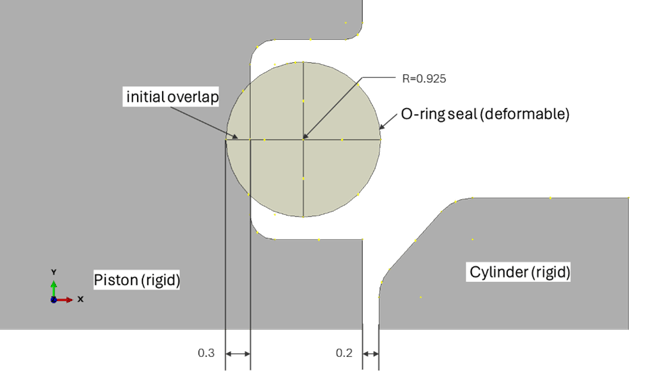
Figure 5. set up of the Axisymmetric O-ring seal model
The interaction properties applied in these simulations are defined as follows:
- Tangential behavior: Frictionless during the interference fit step, and a friction coefficient of 0.3 for the following steps.
- Normal behavior: Hard contact is used throughout all simulation steps (in both Explicit and Implicit simulations).
Because the initial penetration (overclosure) is significant, the contact search distance must be set to a value greater than that penetration. We successfully addressed this by setting the search below parameter to 0.5, which ensured the contact initialization accurately handled the large initial overclosure.
The parameter can be set in the input file using the definition search below = 0.5.
** CONTACT INITIALIZATION DATA
**
*Contact Initialization Data, name=Interference_fit, INTERFERENCE FIT, SEARCH BELOW=0.5, ADJUST=NO
Results
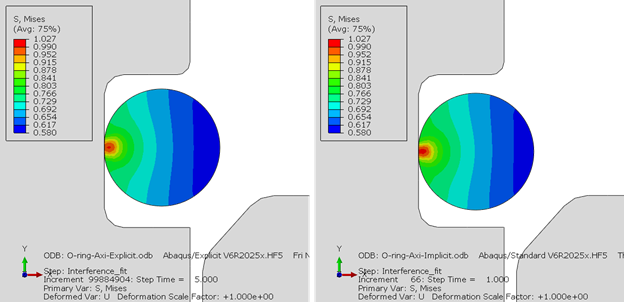
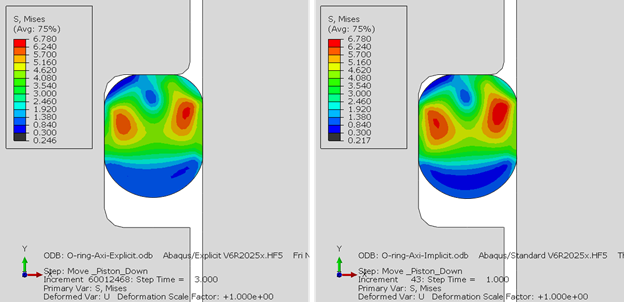
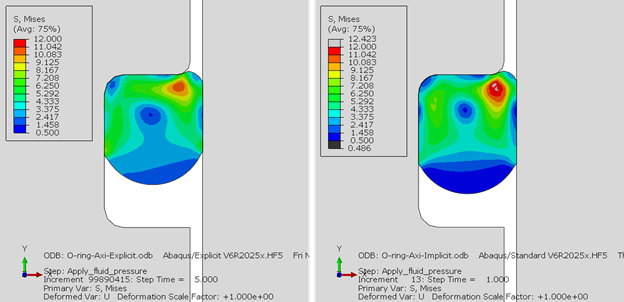
The figures below show a comparison of the results obtained from the explicit and implicit simulations.
Step 01: interference fit
The model initially includes interference between the seal and piston. Resolving this in the first step generates stresses in the seal.
Step 02: Upward displacement of the cylinder
In the second step, the cylinder is displaced upward, causing the seal to be lifted along with it. Maintaining sufficient squeeze is crucial to ensure continuous contact with the sealing surfaces and prevent fluid leakage.
Step 03: Fluid pressure
In the final step, fluid pressure is applied to simulate operating conditions. As the pressure acts on the O-ring, it is forced into the corners of the groove and against the piston/cylinder surfaces, increasing the contact area and pressure.
Summary
In this blog post, we explored the performance and modeling capabilities of Abaqus/Explicit for simulating interference fits. This solver is well suited for analyses involving strong nonlinearities, such as complex contact interactions and large material or geometric deformations. Its explicit time-integration scheme makes it particularly efficient for dynamic or highly transient events, where implicit approach often encounters convergence difficulties.
However, using Abaqus/Explicit for overclosure-type problems, such as interference-fit modeling of rubber seals, comes with certain limitations. Because the explicit solver does not perform equilibrium iterations; instead, the solution progresses through many small, stable time increments, simulations involving severe geometric penetration or preloaded contact conditions typically require significantly more computational time compared to equivalent implicit analyses.
For these reasons, Abaqus/Standard (implicit) is generally more efficient when the goal is to resolve overclosures accurately while keeping computational costs under control. Even so, Abaqus/Explicit remains advantageous when the interference fit represents an initial condition for subsequent dynamic or sequentially coupled steps, as maintaining consistency within a fully explicit workflow avoids the complications of transferring states between solvers.
References
1. How Abaqus Treats Initial Overclosures of Contacting Surfaces https://blog.technia.com/en/simulation/how-abaqus-treats-initial-overclosures-of-contacting-surfaces
2. Abaqus documentation: Contact Initialization for General Contact in Abaqus/Explicit https://help.3ds.com/2025/english/dssimulia_established/SIMACAEITNRefMap/simaitn-c-adjustgeneral.htm?contextscope=all
.png?width=500&name=Blog-CAD%20Essentials-Smarter%20Tools%20for%20Faster,%20More%20Reliable%20CATIA%20Workflows%20(1).png)

 Engineering