
 MBSE
MBSE
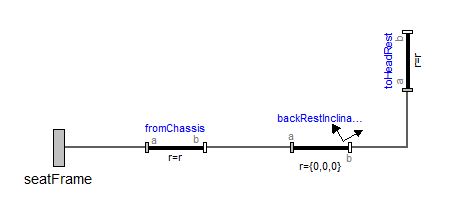
This blog post assists in the creation of a simple seat model in Dymola that will allow to study the head rest’s acceleration, very important criteria for driver comfort, during a Tip-in/Tip-out manoeuvre.
The seat head rest’s acceleration is in most cases different from the vehicle chassis acceleration and has an equally important impact on comfort.
Steps to create a seat model:
- First, we need a frame connector to connect our seat to the rest of the vehicle (i.e. to the chassis frame) that we will name seatFrame.
- Then, we need a component to model the offset of the head rest in the vehicle coordinate system ({0, 0, 0} is assumed at the front of the vehicle, at equal distance of the left and right wheels, at the road level). We will use a fixedTranslation for that. The fixedTranslation allows to create an offset in the 3 directions, we will use one from the chassis frame to the bottom of the back rest and another one from the bottom of the back rest to the head rest. To account for the back rest inclination, we will use a fixedRotation.
This should look like this:
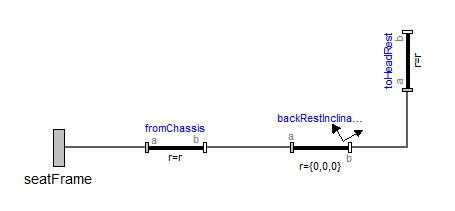
Figure 1: The seat has been positioned.
To be able to easily monitor the head rest acceleration, we can introduce an acceleration sensor in the model (it is in fact an absoluteSensor in which we tick “a” to measure the acceleration).
We will also lump the seat mass using a multibody “body” component.
This seat model should now look like this:
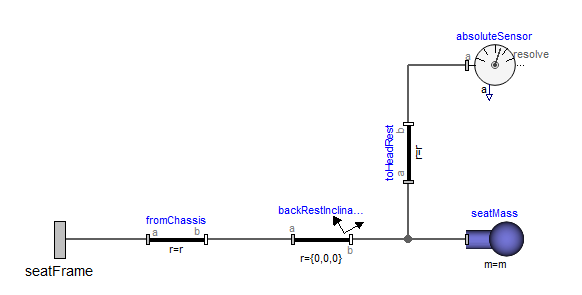
Figure 2: The seat now has a mass and an acceleration sensor.
The seat is now complete… but is infinitely rigid! We need to add some compliance.
Let’s swap the fixedRotation that represents the seat hinge for a revoluteJoint. The revoluteJoint needs to be constrained by a spring and damper. To do this, tick the useAxisFlange in the joint and connect a 1D springDamper in parallel to the joint flanges, like this:
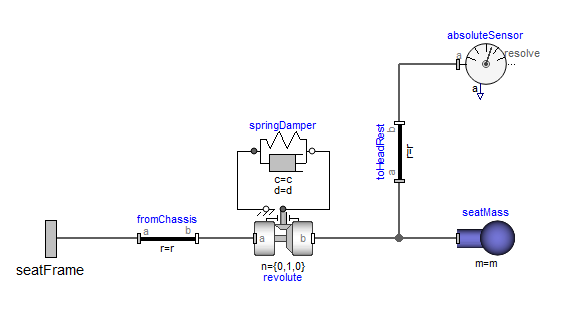
Figure 3: The seat is now compliant.
Make sure the correct axis of rotation is selected in the revolute joint!
We can set the initial seat inclination by parameterising the phi_rel0 and phi_rel.start in the springDamper.
Let’s now put this model in a vehicle and simulate it over a Tip-in/Tip-out:
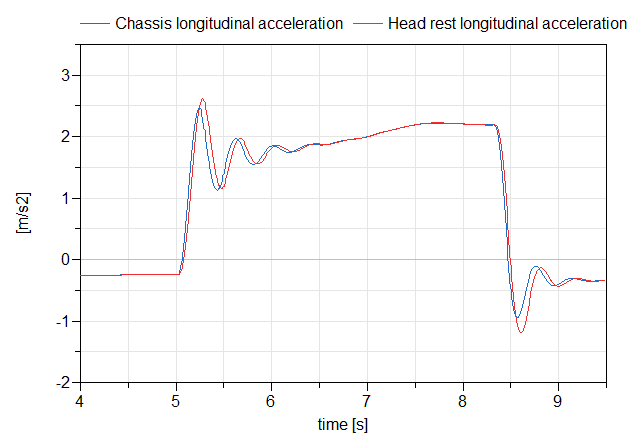
Figure 4: Chassis and Head rest’s longitudinal accelerations.
NB: All the components used in this seat model are available in the Modelica Standard Library. Lash can be easily added to the hinge by using Modelica.Mechanics.Rotational.Components.ElastoBacklash in place of the spring damper.
Please get in touch if you have any questions or have got a topic in mind that you would like us to write about. You can submit your questions / topics via: Tech Blog Questions / Topic Suggestion

