
 MBSE
MBSE
Abstract: This article is aimed to present Modelica-based simple tic and toc functions and their implementation in Dymola. These functions are created to estimate the total elapsed computer processing unit (CPU) time of repeated model experimentations in Dymola. For this purpose, the getTime() function from Modelica Standard Library (MSL) is elected to retrieve the local time at the time instant of this function when called. It is shown that by carefully interpreting and processing the results obtained from the execution of this function just before and after an experimentation study, the total elapsed CPU time of this study can be easily estimated. For demonstrating the usefulness of these created functions, an automated Modelica model experimentation example is adopted from a previous blog article. The pros and cons of these created functions are also discussed.
Keywords: Modelica, Tic, Toc, Function, Dymola, Model, Experimentation, Estimate, Elapsed, CPU, Time.
Software/Tool/Language used: Dymola 2018, MSL 3.2.2
Download a copy of this article as a pdf: Modelica based Tic & Toc Functions in Dymola
Introduction
For developing a reasonably accurate and efficient Modelica model in Dymola, it is important that modellers perform a model experimentation with their model(s). In other words, a model in its developing stage must go through a series of simulations to ascertain an acceptable level of accuracy and efficiency. However, there is always a trade-off between fidelity and simulation speed of a created model.
Methodology
The methodology of this blog article has three stages; they are as follows:
- Create Modelica-based simple tic and toc functions using Modelica.Utilities.System.getTime
- Set-up an experimental study
- Apply the created functions to estimate elapsed CPU time
Modelica-based tic and toc functions in Dymola
MSL getTime() function
An example output of this function is:
= 966, 22, 28, 13, 4, 12, 2017
This corresponds to:
Dec. 4, 2017 at 13:28 after 22.966 s
A Modelica-based simple tic function
function tic
output Modelica.SIunits.Time tic;
algorithm
(ms_tic,sec_tic,min_tic,hour_tic,day_tic,mon_tic,year_tic) :=
Modelica.Utilities.System.getTime();
tic := (ms_tic*0.001)+(sec_tic)+(min_tic*60)+(hour_tic*3600);
end tic;
A Modelica-based simple toc function
function toc
output Modelica.SIunits.Time toc;
algorithm
(ms_toc,sec_toc,min_toc,hour_toc,day_toc,mon_toc,year_toc) :=
Modelica.Utilities.System.getTime();
toc := (ms_toc*0.001)+(sec_toc)+(min_toc*60)+(hour_toc*3600);
end toc;
The elapsed time is calculated as:
ElapsedTime = abs(toc - tic)
Example: An extended automated Modelica model experimentation
The experimentation setup is shown in Table 1.
| Case no. | ts [s] | Vin_v [V] | Vin_freqHz |
|---|---|---|---|
| 1 | 30 | 4.2 | 0:0.01:1.6 |
| 2 | 300 | 4.2 | 0:0.01:1.6 |
| 3 | 3000 | 4.2 | 0:0.01:1.6 |
Results and discussions
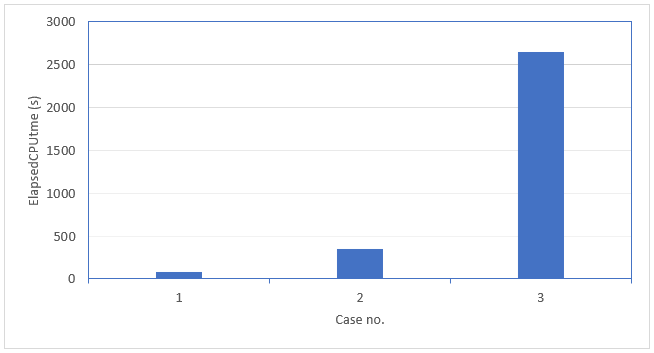
Example outputs:
ElapsedCPUtime = 73.636 s
ElapsedCPUtime = 345.782 s
ElapsedCPUtime = 2644.21 s
Conclusion
This article presented Modelica-based simple tic and toc functions in Dymola. With the aid of the getTime() function from MSL, the implementation procedure for creating simple tic and toc functions in Dymola is demonstrated.
The Modelica package used in this article can be downloaded here.
References
- Dymola - Dynamic modelling laboratory, User Manual Volume 1
- https://www.claytex.com/blog/how-to-automate-modelica-models-experimentation-in-dymola/
- Dymola - Dynamic Modelling Laboratory, User Manual Volume 2
- https://www.modelica.org/documents
- https://www.claytex.com/blog/a-state-space-model-of-a-simple-rc-network-in-dymola-potential-applications/

