
This blog post describes a procedure to debug a crank-angle resolved engine model (CAREM) in Dymola. It helps narrow down to the cause of the problem in case the engine runs but does not produce the expected results.
A CAREM is a multi-domain (mechanics, fluids, thermal, electrical) model so as with any complex model there can be many reasons why it fails to achieve the desired results and figuring out the root cause(s) of all the trouble can be tricky if no procedure has been defined/is used. What follows will help diagnose the problem in an efficient manner.
There are obviously thousands of reasons that can cause a model not to behave as desired and if this procedure cannot treat every single one of them, it covers the most commonly encountered ones.
In VeSyMA – Engines, if the surrogate mode (see the library User’s Guide) is enabled, turn it off.
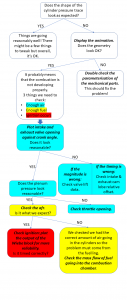
Figure 1. Flow diagram for Engine model debugging
Hopefully, this will have fixed your problem, if it has not and you are a user of VeSyMA-Engines or would like more information on the VeSyMA – Engines library, please contact support@claytex.com.

